Tax Season Without the Stress: Filing GST Made Simple
Watch the video version of this blog post here: https://youtu.be/EMzpFLFIPTE
Yes, you can file a GST/HST return without an accountant and it’s actually easier than you think with the help of my Fast and Easy GST/HST Tax Return Spreadsheet. Please note, I am not an accountant and this should not be taken as tax advice.
TLDR
- Fill out your Fast and Easy GST/HST Tax Return Spreadsheet
- Log into your CRA My Business Account
- File a return by entering the values from the spreadsheet
Step 1 – Complete the Spreadsheet
Start by gathering your expense receipts. Enter your expenses and how much tax you paid. To keep things simple, I like to add up everything in the SUM tab on the spreadsheet and enter it as one line under the expense category.
Next enter your Canadian income and how much tax you collected. You can use the tax feature to apply a flat rate on your sales, but remember you have to charge different rates for customers in each province or territory.
If you’re an Etsy seller, you’ll need my Etsy Canada GST/HST Remittance Calculator to determine how much tax you collected since Etsy doesn’t provide this information. (If you’re buying both sheets, just buy the Etsy Canadian Taxes Bookkeeping Bundle).
Finally, enter any zero rated income (this includes customers outside of Canada)
Step 2 – Log into My Business Account on the CRA
Logging into My Business account on the CRA is the first step to filing your taxes. If you have not setup this account, you may need to
To sign up for a My Business Account on the CRA website, follow these steps:
- Visit the CRA Website: Go to the CRA My Business Account page.
- Create an Account: Select “CRA Register” and enter your social insurance number.
- Security Information: Provide requested information, such as your postal code and a CRA security code.
- Set Up User ID and Password: Create a user ID and password, then set up security questions and answers.
- Activate Your Account: Wait for your CRA security code to arrive by mail and use it to activate your account.
For existing users
- Visit the CRA Website: Go to the CRA My Business Account page.
- Log In: Select “CRA Login” and enter your user ID and password or a Sign In partner.
- Two-Step Verification: Complete the two-step verification process if prompted.
Once logged in, you can access your business account and manage your taxes online.
Step 3 – File Your Return
Go to the GST/HST tab and select your registration (RT001 for most businesses). Scroll down to find the “File a Return” button.
Select GST/HST return from the list of returns and click next.
Enter the reporting period (most businesses use the calendar year) and select whether you are reporting zero rated income (sales that you did not collect tax on such as foreign sales)
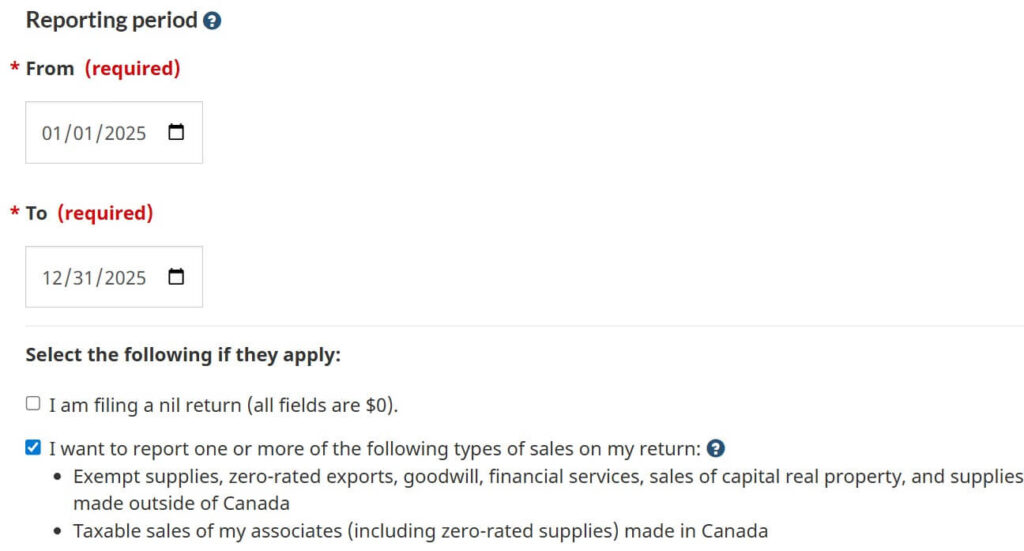
Scroll down and click Next
Enter lines 90 and 91 (if you have foreign income) or line 101 if you’re only reporting taxable Canadian income
Enter 0 for line 102
Enter line 103 according to the Fast & Easy GST/HST Tax Return Spreadsheet
Enter line 106 according to the Fast & Easy GST/HST Tax Return Spreadsheet
Click Next to review and complete your return
Filing your GST might have felt intimidating at first, but once you walk through it step by step, it’s actually pretty manageable. With your numbers organized and a clear process to follow, it becomes just another task you can confidently check off your list. Not so scary after all, right?
If you found this helpful, there’s more where that came from. On my YouTube, I break down small business finances, side hustles, and spreadsheets in a way that actually makes sense (and saves you time). And if you want tools, tips, and freebies delivered straight to you, join my email list — it’s where I share the good stuff first.